
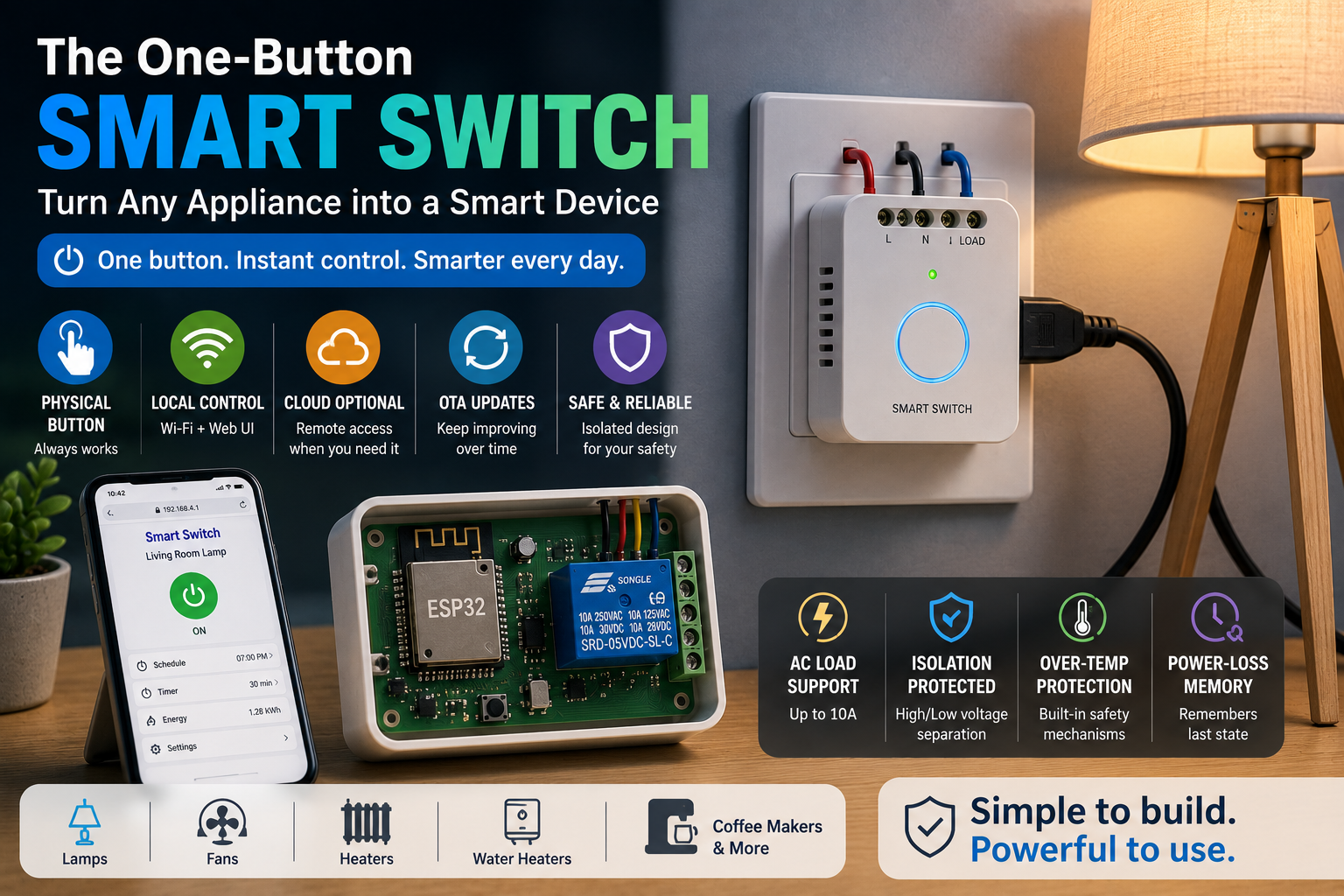
A lamp doesn’t need a touchscreen. A fan doesn’t need artificial intelligence. And an older appliance doesn’t necessarily need to be replaced simply because it wasn’t designed with Wi-Fi.
Sometimes, one well-designed switch is enough.
Combine an ESP32 with an appropriately rated switching stage, a physical button, and thoughtful firmware, and a conventional appliance can gain scheduling, local web control, automation, and remote update capabilities while keeping its original purpose intact.
The interesting part isn’t simply making a relay click from a phone. The real engineering challenge is creating something that remains useful when Wi-Fi disappears, behaves predictably after a power failure, protects the low-voltage electronics from the switched load, and doesn’t force the user to open an app every time they want to turn something on.
That’s what turns a weekend experiment into a much better embedded-systems project.
Important safety note: Mains electricity can cause lethal electric shock, fire, or equipment damage. The sections below intentionally discuss AC switching at a design level rather than providing mains-wiring instructions. For permanent mains-powered installations, use appropriately rated/certified components and enclosures and follow applicable electrical codes; have qualified electrical work performed where required.

Start With One Requirement: The Button Must Always Work
It’s easy to become distracted by Wi-Fi dashboards, MQTT messages, schedules, and mobile interfaces.
But imagine the network goes down at midnight.
If pressing the physical switch no longer turns on the lamp, the “smart” upgrade has actually made the appliance less useful.
The local button should therefore be treated as a primary input rather than an emergency backup. A button press can generate the same internal command used by the web interface:
Physical Button ─┐
                 │
Local Web UI ────┼──► Device State Manager ──► Switching Stage
                 │
Automation ──────┤
                 │
Cloud Command ───┘
This architecture prevents each interface from controlling the hardware independently. Everything requests a state change through one firmware layer, making behavior easier to test and preventing several parts of the program from fighting over the output.
The ESP32 Should Control the Switch, Not Become the Switch
An ESP32 GPIO pin is designed for low-voltage logic. An appliance is a completely different electrical environment.
The switching stage between them therefore matters enormously.
For a mains-connected design, developers need to think about electrical ratings, load characteristics, isolation, fault behavior, PCB spacing, thermal limits, enclosures, and applicable safety requirements—not simply whether a relay module says “10 A” on its case.
UL notes that relay-operated and solid-state load-control products are covered by relevant product safety standards, while relay manufacturers publish specific precautions around voltage, current, temperature, and load behavior.
This is also why an inexpensive exposed relay board that works during a bench experiment shouldn’t automatically be treated as a finished consumer product.
Mechanical Relay or Solid-State Relay?
Both technologies can turn electrical loads on and off, but they behave differently.
| Mechanical Relay | Solid-State Relay |
|---|---|
| Physical switching contacts | Semiconductor switching |
| Audible click | Silent operation |
| Useful for many general switching jobs | Useful for frequent or silent switching |
| Contacts experience mechanical wear | No moving contacts |
| Off-state behavior is straightforward for many designs | Leakage and thermal behavior require consideration |
Omron describes solid-state relays as semiconductor-based devices with no moving contacts and notes that they are particularly useful for high-frequency and high-speed switching. The same documentation also warns that SSRs require attention to surge current, voltage, heat, and failure behavior.
The decision shouldn’t be based on which component seems more modern. It should follow the actual appliance load.
A heater, lamp, fan, compressor, and electronic power supply can present very different switching conditions. Inrush current and inductive behavior can be especially important when selecting a switching device.
Isolation Is What Separates the Two Worlds
Inside the project are effectively two electrical systems.
One side contains the ESP32, button, LEDs, and low-voltage electronics. The other side controls the appliance’s power.
A thoughtful design keeps those domains appropriately separated.
That means considering the complete physical construction—not just adding an optocoupler symbol to the schematic. PCB layout, connector selection, insulation distances, mechanical barriers, accessible metal, enclosure design, and cable management all influence the final level of protection.
With solid-state relays, manufacturers commonly use optical isolation between input and output circuitry.
For a maker project, one of the safest approaches is often to keep experimentation on the low-voltage control side and use a properly rated, enclosed, certified switching product for the hazardous-voltage portion rather than building exposed mains circuitry from scratch.
Give the Electronics a Real Enclosure
A smart switch isn’t finished when the breadboard works.
Loose wires, exposed terminals, and boards sitting on a desk are acceptable for certain low-voltage development activities, but they are not an appropriate enclosure strategy for equipment controlling mains loads.
The enclosure has several jobs simultaneously: preventing accidental contact, providing strain relief, keeping conductors mechanically secure, protecting the PCB, managing heat, and ensuring the physical button can be operated safely.
It should also be designed around failure conditions rather than just normal operation.
Ask:
What happens if a wire loosens?
What happens if the switching device becomes hot?
Can a user touch anything energized without tools?
Does pulling the appliance cable place force on a PCB terminal?
Those questions produce better hardware than choosing an enclosure only because the PCB fits inside it.
Local Control Makes the Device Feel Instant
Once the switching hardware is handled appropriately, the ESP32 becomes particularly useful because Wi-Fi can provide a local interface without requiring dedicated control hardware.
The device can host a lightweight web interface accessible from a phone or computer on the same network.
A useful interface doesn’t need much:
Appliance: ON
[ TURN OFF ]
Timer: 37 minutes remaining
That’s often enough.
A complex dashboard with graphs, accounts, animations, and nested menus may actually make a one-button switch worse.
The interface should mirror the simplicity of the physical product.
Your Smart Switch Should Survive Without the Internet
There’s an important distinction between Wi-Fi and the cloud.
A device can use the home’s local Wi-Fi network without sending every command to an external server. For a basic smart switch, this creates a valuable local-first architecture:
            ┌── Physical Button
            │
Appliance ◄─┤── ESP32 Local Web Control
            │
            └── Local Automation
                     │
              Optional Cloud Link
If the internet connection disappears, the physical button and local control can continue operating.
Cloud connectivity then becomes an enhancement rather than a dependency.
This is particularly useful for something as fundamental as switching an appliance. Users shouldn’t lose basic control because an external service is unavailable.
Provisioning Shouldn’t Require Editing Firmware
Hard-coding home Wi-Fi credentials into firmware may be convenient during development, but it produces an unpleasant finished product.
The ESP32 ecosystem supports provisioning approaches based on both BLE and SoftAP. Espressif’s provisioning subsystem explicitly supports Wi-Fi credential configuration through BLE or a SoftAP with an HTTP-based setup process.
That allows the first startup to work more like a consumer product:
- Power the switch.
- Enter temporary setup mode.
- Select the local Wi-Fi network.
- Store the configuration.
- Reboot into normal operating mode.
After provisioning, the temporary setup service should be appropriately restricted or disabled rather than remaining unintentionally exposed.
Decide What Happens After a Power Failure
This small firmware decision has surprisingly large consequences.
Suppose the smart switch controls a heater and electricity fails. When power returns, should the appliance automatically return to its previous ON state?
Maybe not.
For another application, restoring the previous state might be exactly what users expect.
Instead of blindly storing the last relay state, define an explicit startup policy such as:
- Always OFF after startup
- Restore previous state
- Follow schedule
- Require user confirmation
The correct choice depends on the appliance and the consequences of unexpected activation.
Safety-critical behavior should never be decided purely for convenience.
Treat the Button as More Than ON/OFF
A single physical button can provide several functions without creating a complicated user experience.
A normal press can toggle the appliance.
A deliberate long press could enter provisioning mode.
A much longer, clearly intentional action might initiate a configuration reset.
The key is preventing ordinary interaction from accidentally triggering administrative behavior.
Firmware should also debounce the input correctly so that one physical press doesn’t appear as several electrical events.
This is a small detail, but the perceived quality of an embedded product is often determined by interactions exactly like this.
Build a State Machine Instead of Scattering digitalWrite()
Early prototypes often control a relay from multiple locations in the code.
A button handler changes the GPIO.
The web server changes it again.
A timer modifies it somewhere else.
Then a cloud callback adds a fourth path.
The project quickly becomes difficult to reason about.
A better approach is to keep one authoritative device state.
For example:
OFF
 │
 ├── Button ─────────► ON
 ├── Web Command ────► ON
 └── Schedule ───────► ON

ON
 │
 ├── Button ─────────► OFF
 ├── Web Command ────► OFF
 └── Timer Expired ──► OFF
The switching output then reflects the state machine instead of being directly manipulated throughout the firmware.
That architecture also makes it easier to add future features without creating unpredictable interactions.
Add OTA Before the Enclosure Becomes Inconvenient
Once a smart switch is installed, repeatedly opening the enclosure and connecting a programming cable becomes annoying.
Over-the-air firmware updates solve that problem.
ESP-IDF supports OTA update architectures where a running application receives new firmware and writes it to an OTA application partition. Espressif also provides HTTPS OTA support for firmware delivery over HTTPS.
For a finished design, an update strategy should consider more than simply receiving a binary.
Think about:
- update authenticity,
- interrupted downloads,
- rollback or recovery,
- firmware compatibility,
- what happens if power disappears during an update.
A smart device should become easier to maintain after installation, not harder.
Add Intelligence That Actually Helps
Once reliable switching exists, automation becomes useful.
A smart switch could support a countdown timer, daily schedule, energy-saving shutoff, local sensor trigger, or home-automation command.
But features should solve real problems.
For example, an automatically expiring switch can be useful for devices that users frequently forget to turn off. A local temperature rule may be useful in certain controlled applications. Scheduling can make ordinary lighting more convenient.
The important principle is that automation should sit above reliable manual operation.
If every smart feature is disabled, the button should still work.
Failure Modes Are Part of the Design
Before calling the project finished, deliberately imagine everything going wrong.
Wi-Fi disappears: local button still functions.
Cloud service disappears: local interface remains available where practical.
ESP32 restarts: output follows the defined safe startup policy.
Firmware update fails: recovery strategy prevents an unusable device.
User changes router: provisioning can be intentionally reopened.
Switching stage fails: hardware design accounts for the component’s documented failure behavior.
Omron notes, for example, that semiconductor damage in SSRs can result in short-circuit failure modes where a load may no longer switch off normally.
Thinking through these conditions is what transforms a demo into engineering.
A Weekend Project That Teaches More Than Wi-Fi
At first glance, the one-button smart switch appears to be a simple ESP32 exercise.
In reality, it brings together several important embedded-system disciplines:
Hardware design — interfacing low-voltage control electronics with an appropriate switching stage.
Firmware architecture — state machines, button handling, persistent configuration, timers, and recovery.
Networking — Wi-Fi provisioning, local interfaces, and optional remote connectivity.
Product UX — making physical and digital controls behave consistently.
Maintainability — OTA updates and configuration recovery.
Safety engineering — considering isolation, component ratings, enclosures, load behavior, and predictable failure states.
That’s why this seemingly small project can teach more than building a much larger collection of disconnected demos.
Frequently Asked Questions
Can an ESP32 directly switch an appliance?
No. ESP32 GPIO is low-voltage logic and should control an appropriately designed switching stage rather than an appliance load directly. Mains-connected designs also require appropriate isolation, component ratings, mechanical protection, and compliance considerations.
Is a relay or SSR better for a smart switch?
Neither is universally better. Electromechanical relays and SSRs have different switching, thermal, lifetime, leakage, and load characteristics. Selection should be based on the actual voltage, current, load type, switching frequency, and applicable safety requirements.
Can an ESP32 smart switch work if Wi-Fi fails?
A well-designed device should keep its physical control operational regardless of network availability. Local automation can also continue if it doesn’t depend on an external service.
Why are OTA updates useful?
OTA allows firmware to be updated after installation without requiring physical programming access. ESP-IDF provides OTA mechanisms as well as HTTPS-based update support.
Should the appliance automatically turn back on after a power outage?
That depends on the appliance and its risk profile. Developers should define an intentional startup policy rather than automatically restoring a previous ON state in every application.
Conclusion
Turning an ordinary appliance into a connected device doesn’t require replacing everything that already works. An ESP32, a thoughtfully selected switching solution, a physical button, and carefully structured firmware can add useful local control, scheduling, optional remote connectivity, and OTA maintenance to existing equipment.
The bigger lesson is that the best smart switch isn’t the one with the most features. It’s the one that behaves predictably. The button works without the internet, the firmware knows what to do after a restart, configuration is recoverable, and network features enhance rather than control the basic function of the appliance.
Build those qualities into the project from the beginning, and a simple one-button switch becomes an excellent exercise in real-world embedded product design.